
Free AI Desktop App for Font and Design Lovers that runs locally
If you love designing custom merch, crafting, or selling on platforms like Etsy, you know the daily struggle of preparing and editing your design files. You find the perfect font or graphic asset, but then you get stuck with: the background isn't transparent or the resolution is too low for a print, or your favorite online tool suddenly demands a premium subscription because you ran out of "free monthly credits."
Uploading dozens of design assets to cloud-based tools one by one is exhausting, expensive, and a massive time-sink. Fortunately, there's a new way to handle these tedious tasks right from your own computer, completely free.
What is Creative Fabrica Studio Desktop?
Creative Fabrica Studio Desktop is a free application available for both Windows and macOS. It brings the robust design ecosystem of Creative Fabrica straight to your computer, combining it with powerful AI tools that run directly on your own hardware.
Instead of relying entirely on cloud processing, the app downloads specific AI models directly to your machine. After these models are installed, supported local tools can run on your computer without counting credits or forcing you onto a paid plan.
Why Local AI is a Game-Changer for Creators
Running of AI tools locally on your desktop offers massive benefits over traditional web-based platforms:
- Unlimited Quota: There is no credit system or usage cap for the supported local tools. You can process as many files as you need.
- Total Privacy: Because the generation happens on your device only, the custom designs, fonts, and prompts stays private and doesn't leave your computer.
- Zero Cost: No subscription or hidden paywalls or even credit cards are required to use the local AI App.
- Offline Capability: Once the models are downloaded, you can continue working even if the internet connection drops out or is slow.
Hands-On Workflow- Removing background on local machine
Let's look at a practical example of how this software speeds up the editing of images. Imagine you've created a custom text graphic using a fancy font, but it has a solid background and the resolution is too low to print cleanly on a t-shirt or mug.
Step 1: The Original Image
We start with a basic graphic that has a blue background. If you try to print this directly onto a colored product i.e. tshirt, the ugly white box will ruin the design.

Step 2: Running the Local Tools
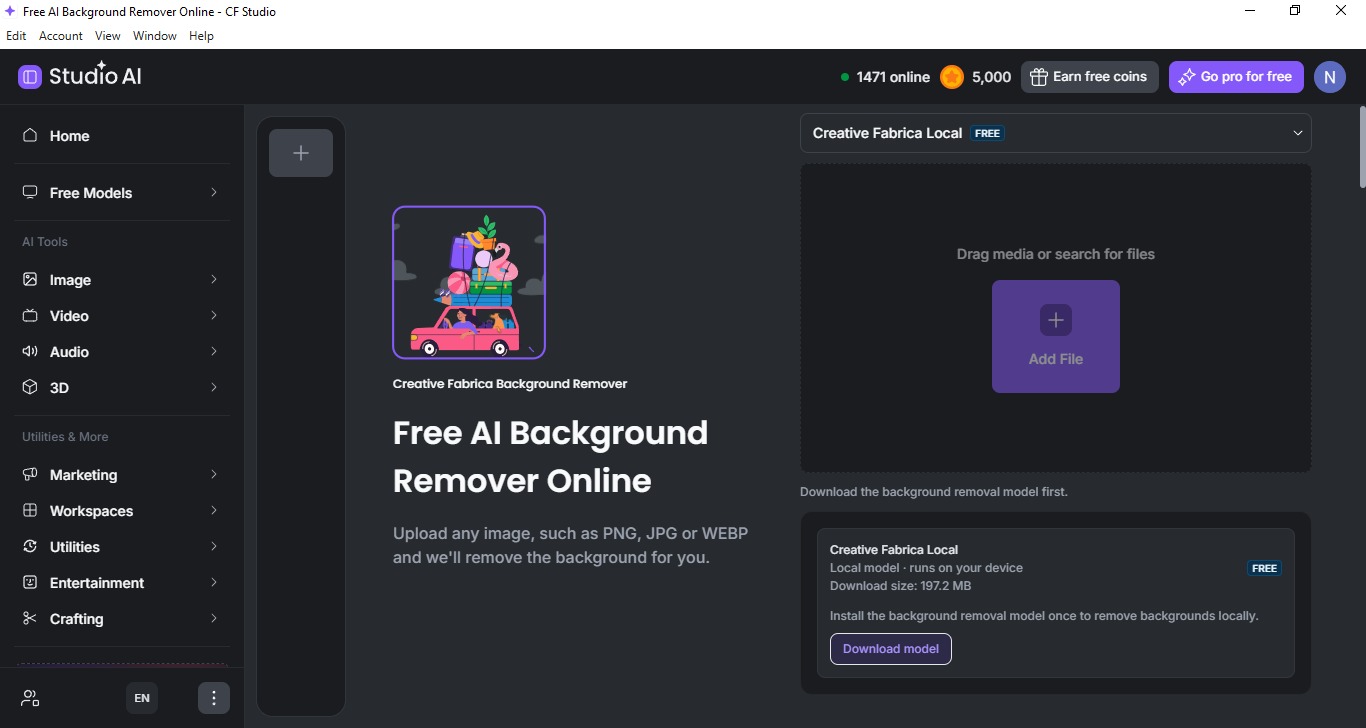
Using Creative Fabrica Studio Desktop, you simply drag your image into the workspace. You first download and install the app, then go to the Free Models tab and then click background remover as you finish logging in. Upload or drag your photo to the app and then click download model to run the model locally, With one click of the free Background Remover, the local AI instantly isolates the text and cuts out the background.
Step 3: The Finished Result
The final asset is a high-resolution, crystal-clear transparent PNG. It is completely ready to be used in Cricut Design, printed straight on the tshirt or mug, or anywhere to use online.

Who Benefits the Most From This App?
This desktop application is a perfect fit for anyone managing large volumes of visual assets:
- Etsy & POD Sellers: It cleans up product photos and enhances design resolutions for high-quality printing swiftly.
- Cricut & Sublimation Crafters: The App Instantly generates clean, transparent PNG files for cutting machines without paying for premium software extensions.
- Digital Product Designers: The App also Easily prep font bundles, clipart, and printable templates locally.
Pros and Prerequisites
Here is what works great for the app and what you should keep in mind before downloading it.
Pros:
- The AI software is completely free locally (Voice, Image, Background Removal, and Upscaling).
- Supports both devices i.e. Windows and Mac.
- Your files are private and secure on your own drive.
- If you ever choose to upgrade, it can be done seamlessly between free local tools and premium cloud models.
Prerequisites:
- GPU / RAM: Because the tools run on your own machine, local AI performance depends heavily on your computer's specs (like your GPU and RAM).
- Internet Connection: The AI models must be downloaded for usage, which requires an internet connection and disk space also.
- Newer Machines: If you are running a very old computer, processing times for upscaling or image generation will be slower compared to cloud rendering.
Frequently Asked Questions
- Is Creative Fabrica Studio Desktop free?
- Yes. The app is absolutely free to download, and the AI tool requires no credit card, no subscription, and has no usage limits.
- Does the background remover run locally?
- Yes. The background remover runs locally, meaning the process happens entirely on your computer or hardware.
- Does it work on Windows and Mac?
- Yes, the AI tool supports both operating systems with full functionality.
- Are my images uploaded to a server?
- No, everything happens locally on your computer. All the prompts, images, and output files stay completely on your computer.
- Do I need an internet connection?
- Yes, an internet connection is required to download the app and install the local models initially. Once the models are saved to your computer, the supported local tools can run completely offline.